

MAMBI Happy Planner horizontal dimensions & measurements (classic size) for making planner stickers
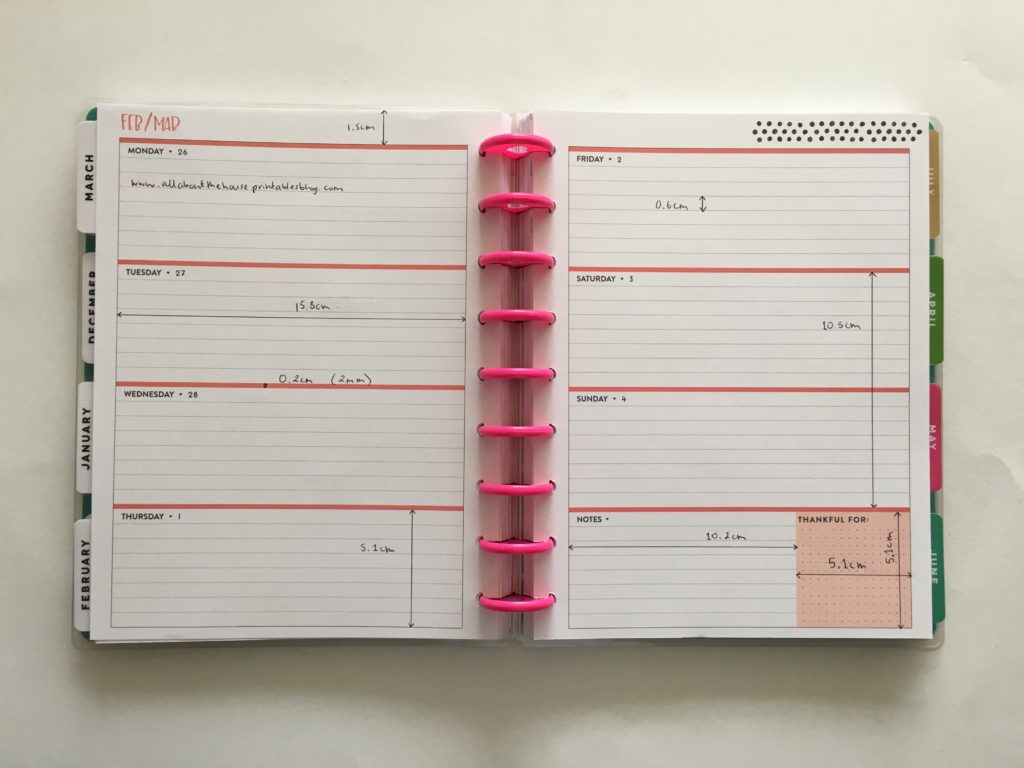
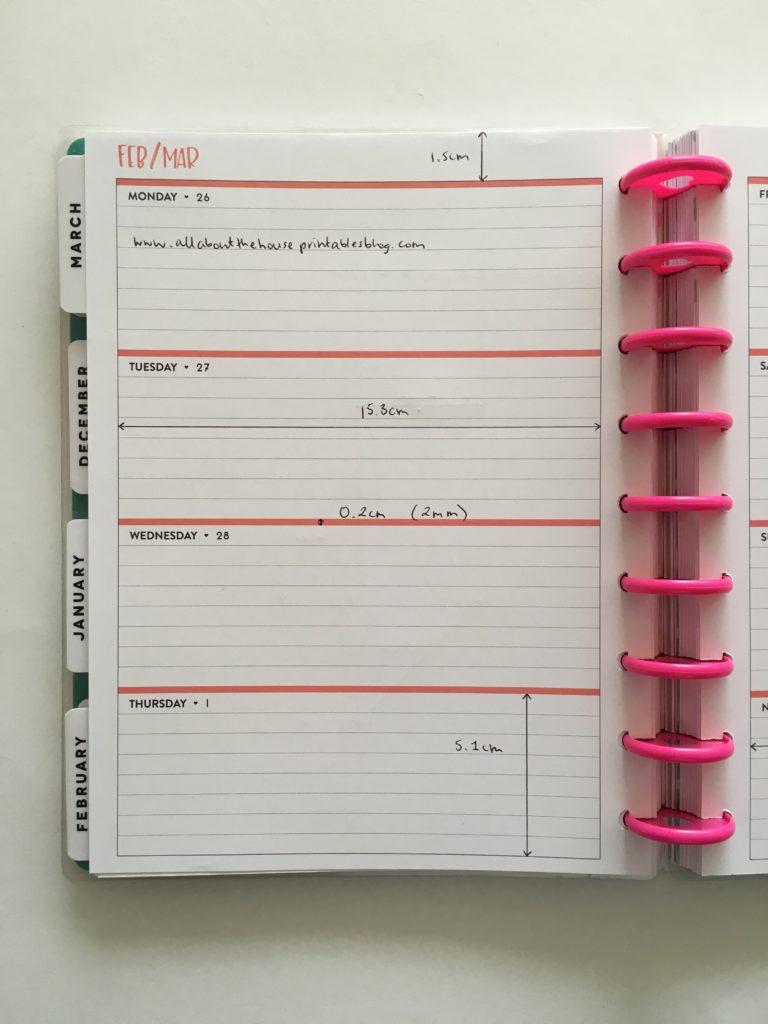
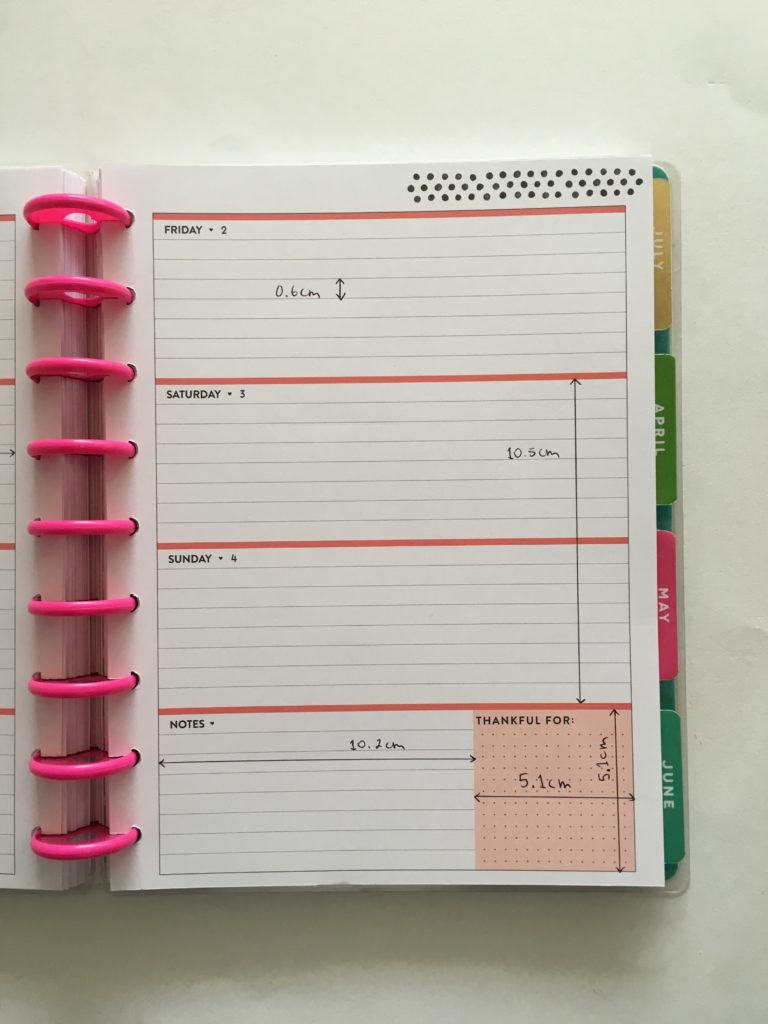
If you want to make your own planner stickers and are using the horizontal classic size Happy Planner by Mambi (or you sell planner stickers and a customer has requested stickers in this size but you don’t want to buy the planner), then here are the dimensions of the weekly spread:
Dimensions of the weekly spread – Happy Planner Horizontal
- From the top of the page to the top of the first box = 1.3cm
- Width of each daily box = 15.8cm
- Height of each daily box = 5.2cm
- Height of the colored lines between the boxes = 0.2cm (2mm)
- Height of the writing lines = 0.6cm
- Height of the Saturday and Sunday boxes (for weekend stickers) = 10.5cm
- Width of the notes box from the left edge to the left side of the thankful box = 10.2cm
- Width of the thankful box box (beside the notes section) = 5.1cm
- Height of the thankful box box (beside the notes section) = 5.1cm
If you prefer to work in inches, see this website for a calculator that will convert it for you.
A lot of people immediately think they can only use stickers sized exactly for the planner that they’re using – this is not the case! I make my planner stickers sized for the Erin Condren life planner but have used them in the Happy Planner classic size, mini happy planner, horizontal Erin Condren planner and various other planners.
Most stickers such as icons, box stickers, headers (title stickers) etc. will work in any planner you can always trim checklist stickers down to size.
Click the photo to enlarge
Pin for later!
But if you have your heart set on stickers that suit the exact dimensions of the planner you’re using and want to know the dimensions of the mini Happy Planner, all the Erin Condren Life Planners, Plum Paper Planners and Limelife Planners, the dimensions are included in my ecourse: How to make planner stickers, where, you guessed it, I’ll teach you how to make your own planner stickers 🙂 (Plus the cost of the ecourse is cheaper than the cost of buying all those planners!)
Some of the planner stickers you could make:
- Header stickers
- Sidebar stickers such as habits, steps tracking, meal planning, laundry, cleaning tasks, mileage tracking, social media posting if you have a blog or online business
- Icon stickers such as: cleaning, meal planning, travel, money, appointments, health, pets
- Weekend banner flags
- Custom stickers e.g. names of family member’s to track their schedule
- Divider stickers such as ‘washi’ stickers with patterns
- Appointment labels
- Money stickers (especially bill due stickers which are always handy!)
- Notes page stickers
- Routine stickers (so if you do the same tasks each month, you can create custom stickers rather than paying someone else to design them and keep paying and waiting for them to ship to you – you can make the exact stickers to suit your needs!)
Click here to enroll in the course.
If you want some more details about the course, I recorded a video for you 🙂

SOME OF THE TUTORIALS IN THE COURSE INCLUDE:
GETTING STARTED
- Silhouette portrait versus cameo: how to choose which machine to use
- Printed versus printable stickers
- File formats (and which file format you should be using)
- Different types of label paper: which one is best?
- Tips/things to keep in mind when making planner stickers
- Choosing the right size for your sticker sheets
- Printing stickers: how to make the colors POP
SILHOUETTE BEGINNER TUTORIALS
- Introduction to silhouette studio (I shared this video as a free pre-lude to the course in this post)
- How to use the align tools in Silhouette Studio
- How to create perfectly proportioned shapes
- How to ensure there is no white space on your stickers, even if your blade slips (2 methods)
- Choosing cut settings for your silhouette
FONTS
- Using the text tool in Silhouette
- Downloading and installing fonts
- Recommended fonts list
CHOOSING COLORS
- How to choose colors (and my favorite resource)
- Popular color combinations
- Other favorite color tool resources
- How to change colors in Silhouette
- How to color match anything
- The printables I use to keep track of colors used in sticker kits (download)
- Bonus: how to make icons white
STICKER SIZE DIMENSIONS
- Plum Paper Sticker Size Dimensions (monthly calendar, vertical, horizontal, student planner, notes and checklist)
- Erin Condren Planner Sticker Size Dimensions (monthly calendar, vertical, hourly, horizontal, teacher planner)
- Limelife Planner Dimensions (All planner styles & sizes)
- MAMBI Happy Planner Dimensions (mini Happy Planner, Classic and Big Vertical)

DESIGN TUTORIALS
- Icon stickers (video tutorial)
- Rounded rectangle or square stickers (video tutorial)
- How to make header stickers (video tutorial)
- Checklist stickers (video tutorial)
- How to make quarter box labels – perfect for appointments, bill due stickers, reminders etc. (3 different styles) (video tutorial)
- How to make hydrate stickers (video tutorial)
- Routine stickers (video tutorial)
- How to make flag stickers (video tutorial)
- Ombre stickers (2 different ways) (Video tutorials)
- Sidebar stickers (2 different ways) (video tutorials)
- How to make word only stickers (video tutorial)
- How to add lined writing space to stickers (video tutorial)
- Making stickers (at any size you like) with patterns (video tutorial)
- How to make teardrop stickers (video tutorial)
- How to make scallop border (video tutorial) and ideas for using it in your sticker design
- How to make hexagon stickers (video tutorial)
HOW TO MAKE YOUR STICKERS UNIQUE
- 15 Ways to make your stickers unique
- Making multi-colored stickers (video tutorial)
- Making stickers using pattern overlays (and where to find them) (video tutorial)
- 10 Ways to use leftover space on your sticker sheets
If you’re thinking, I’d love to make them and I’d love to start a sticker shop on Etsy, but aren’t there already enough people making and selling stickers? The answer I always say is no! There are plenty of sticker shops making the same type of stickers. In the course I provide lots of examples of sticker designs and tweaks you can make to a basic design to make it unique and make your stickers stand out. The planner craze isn’t going away anytime soon!

SPEEDING UP THE DESIGN PROCESS
- How to quickly recolor stickers (video tutorial)
- My secret weapon for making a LOT of stickers in a short amount of time
- How to quickly resize stickers (video tutorial)
- How to efficiently make an entire sheet of stickers – 2 options (video tutorials)
- Download my quality control / workflow checklist for making perfect planner stickers
MAKING PLANNER STICKER KITS
- How many (and what type) of stickers to include in your sticker kits
- How to make a sticker kit
- Essential things to include when making a sticker kit
- How to make a lot of sticker kits in a short amount of time (video tutorial)

Click here to enroll in the course
STARTING A STICKER BUSINESS
- Pricing your stickers
- Tips for selling physical stickers
- Selling digital files
- Additional Tools for growing your Etsy business
RESOURCES
- 10 Printable worksheets to organize your sticker making
- Where to get icons to use for your stickers (my favorite resources list)
- How to download icons and save them to your computer (video tutorial)
- Best printer brand for printing stickers
- Where to buy label paper (resource list)
- 130+ sticker ideas
- Guide to terms of use and licencing
- Where to get graphics & patterns to use in your stickers
- 100 Stock Photo Websites for making promotion images for your stickers (downloadable list)
- Coupon for my graphics shop: PaperCravings and planner printables + business tools shop, AllAboutTheHouse
- Coupon for my ecourse: How to make patterns in Photoshop and Monetize your Designs

Click here to enroll in the course
I’m intending to add more tutorials to the course (you’re welcome to send me an email with a request for a tutorial ? ) and if I do so and you’re already enrolled, you’ll get access to any updated and additional tutorials for no additional cost. You’ll receive lifetime access to the course!

If you haven’t already, you can watch the first tutorial of the ecourse here.
If you want to finally learn how to make the perfect planner stickers that suit YOUR planning needs, in the colours you like, in fonts that you like etc. then what are you waiting for?!
Click here to enroll in the course
If you have any questions about the ecourse, just send me an email to [email protected] 🙂
Related Posts
- How to Choose a Printer (Including the best printer for printing printables and planner stickers)
- How to organize small planner stickers using a reciepts folder
- How to organize planner stickers using folders (plus free printable labels)
- Silhouette Studio Software versus Photoshop: Which is better for making planner stickers?
- FREE Printable planner stickers – pineapple lists for the Erin Condren vertical Life Planner (or use with any planner)

One Comment