Digital Declutter Checklist (Free printable) to organize your computer files, inbox, photos, backups and workspace
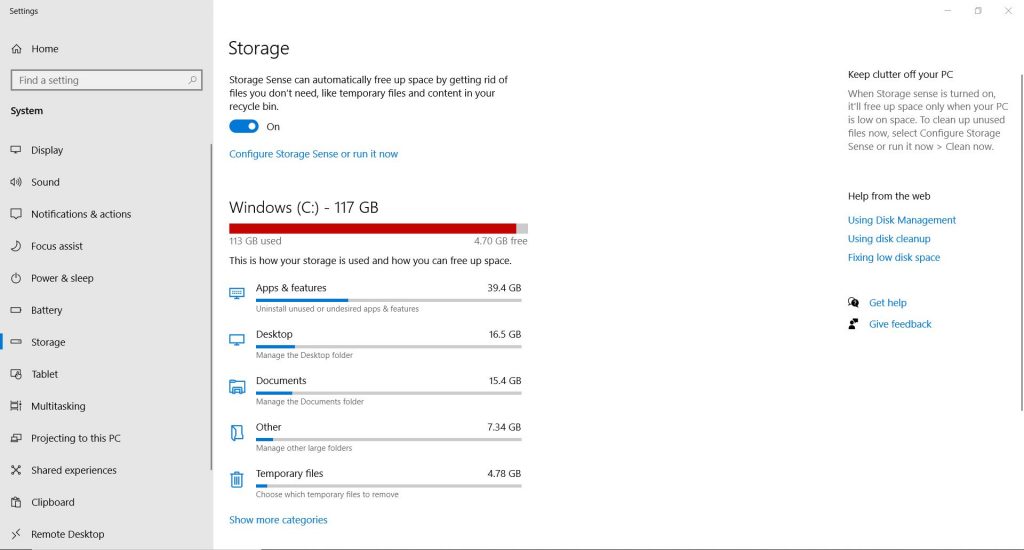
I’ve switched computers and external hard drives many times over years and my filing system well, it was getting out of hand. My computer had almost no storage space left and was running slow, definitely a case of out of sight, out of mind. So I created a list of all the digital decluttering I needed to do, and am sharing it in this post in case you need to clean up your computer too.
Digital Declutter Checklist
Computer Maintenance
- Review current filing system
- Sort into clearly labelled folders
- Desktop files
- Document files
- Video files
- Delete unused shortcuts on desktop
- Choose & install new desktop wallpaper
- Run anti-virus scan
- Empty recycling bin
- Set up a Trello board (or another system) with websites to look at, wish list items to buy that you’re checking sales for, helpful tutorials you want to refer back to later, recipes to try or any other specific webpages you want to come back to in the future
- Set up (or clean up your existing) password log, or use a site like LastPass
- Deleted unused apps
- Wipe computer screen
- Use compressed air to clean keyboard
- Wipe computer keyboard
- Tag external hard drives with cord organizers
Related post: How to plan your week using Trello
Cull files
- Check storage menu of computer
- Temporary files
- Desktop
- Documents
- Photos
- Video files
- Downloads folder
- Risk disk file clean up
- Empty Recycling bin
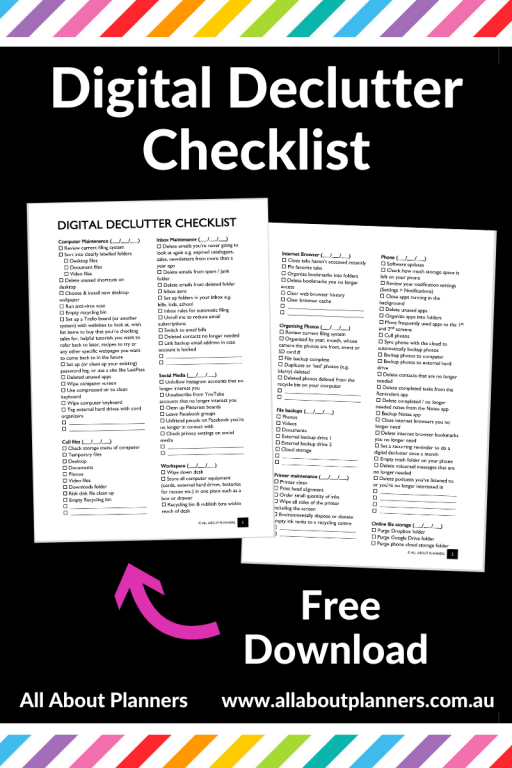
Click here to download the Digital declutter checklist
Inbox Maintenance
- Delete emails you’re never going to look at again e.g. expired catalogues, sales, newsletters from more than a year ago
- Delete emails from spam / junk folder
- Delete emails from deleted folder
- Inbox zero
- Set up folders in your inbox e.g. bills, kids, school
- Inbox rules for automatic filing
- Unroll me to reduce email subscriptions
- Switch to email bills
- Deleted contacts no longer needed
- Link backup email address in case account is hacked
Social Media
- Unfollow Instagram accounts that no longer interest you
- Unsubscribe from YouTube accounts that no longer interest you
- Clean up Pinterest boards
- Leave Facebook groups
- Unfriend people on Facebook you’re no longer in contact with
- Check privacy settings on social media
Workspace
- Wipe down desk
- Store all computer equipment (cords, external hard drives, batteries for mouse etc.) in one place such as a box or drawer
- Recycling bin & rubbish bins within reach of desk
Internet Browser
- Close tabs haven’t accessed recently
- Pin favorite tabs
- Organize bookmarks into folders
- Delete bookmarks you no longer access
- Clear web browser history
- Clear browser cache
Organizing Photos
- Review current filing system
- Organized by year, month, whose camera the photos are from, event or SD card #
- File backup complete
- Duplicate or ‘bad’ photos (e.g. blurry) deleted
- Deleted photos deleted from the recycle bin on your computer
Related post: How I plan and make travel photobooks (plus download my workflow printable)
File backups
- Photos
- Videos
- Documents
- External backup drive 1
- External backup drive 2
- Cloud storage
Read more: How to backup files on your computer or laptop (best and cheapest cloud storage software)
Printer maintenance
- Printer clean
- Print head alignment
- Order small quantity of inks
- Wipe all sides of the printer including the screen
- Environmentally dispose or donate empty ink tanks to a recycling centre
Read more: How to clean your printer (prevent smudging, streaks and make the colors POP!)
Phone
- Software updates
- Check how much storage space is left on your phone
- Review your notification settings (Settings > Notifications)
- Close apps running in the background
- Delete unused apps
- Organize apps into folders
- Move frequently used apps to the 1st and 2nd screens
- Cull photos
- Sync phone with the cloud to automatically backup photos
- Backup photos to computer
- Backup photos to external hard drive
- Delete contacts that are no longer needed
- Delete completed tasks from the Reminders app
- Delete completed / no longer needed notes from the Notes app
- Backup Notes app
- Close internet browsers you no longer need
- Delete internet browser bookmarks you no longer need
- Set a recurring reminder to do a digital declutter once a month
- Empty trash folder on your phone
- Delete voicemail messages that are no longer needed
- Delete podcasts you’ve listened to, or you’re no longer interested in
Online file storage
- Purge Dropbox folder
- Purge Google Drive folder
- Purge phone cloud storage folder
Blog
- Review website load speed
- Check number of website visitors per month
- Check for broken links and update accordingly
- Answer or delete comments
- Review draft blog posts
- Delete uploaded but unused photos
- Backup blog
- Backup blog photos
- Update plugins
- Delete unused plugins
- Upgrade Wordpress
Print a copy of the checklist to use now, and re-use each year for a computer clean up. The checklist is editable so you can digitally mark it off using Adobe Reader, or print and cross things off by hand. There is additional space to add your own tasks to the list as well.
I’ve added sections to put the date you completed each task (inbox maintenance, computer maintenance etc.) so you can tackle the list in sections and see how long it’s really been since your last clean up.
Click here to download the printable checklist.
Click here to download the Digital declutter checklist
Related posts:
- The 3 things I plan digitally instead of using pen and paper
- How I plan and make travel photobooks (plus download my workflow printable)
- How I use Microsoft Word to plan my travel itinerary (my template & planning process)
- Pen and paper versus digital: which is better for keeping track of your money?
Found this post helpful? Pin it!